


Upgrade
4.43.80K Reviews
App Specs
- Version
- 1.33.0
- Updated On
- License
- Free
- Downloads
- 1,000,000+
- Developer
- Upgrade, Inc.
- Categories
- Finance
- Platform
- Android, iOS
Screenshots
 Analysis by AppCompare
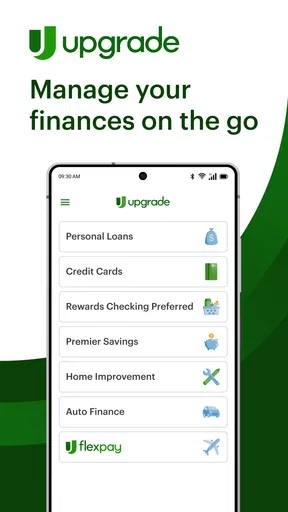
I approached Upgrade as a practical money app rather than something to open only when I need a loan. Developed by Upgrade, Inc., it brings personal loans, cards, and rewards checking into one finance-focused experience. That combination makes it useful for people who want fewer separate financial apps, although it also means the best experience depends on how comfortable you are keeping several money tasks under one roof.
The app is free to download and is rated for Everyone, which makes the basic entry point approachable. It has passed the one-million-install mark and holds a 4.4 average from roughly thirty thousand ratings, with about 3.8 thousand written reviews. Those figures suggest that it has reached a broad audience, but I would not treat popularity as a substitute for checking whether its particular lending and banking options fit your situation.
How I would use Upgrade day to day
I would make Upgrade part of a short, scheduled money check rather than opening it every time I spend. In my routine, I’d use the relevant account or product to answer one specific question—what is due, what has changed, or whether a borrowing choice still fits—then stop once I have the answer. That keeps convenience from turning into unnecessary activity and makes it easier to notice when something genuinely needs attention.
A simple starting workflow for borrowing and spending
My first step with a finance app like this is to decide which job it needs to perform. Upgrade can sit in three different places in a personal money routine: planning a personal loan, using an Upgrade card, or managing rewards checking. Treating those as separate decisions prevents the app from becoming a confusing collection of financial products.
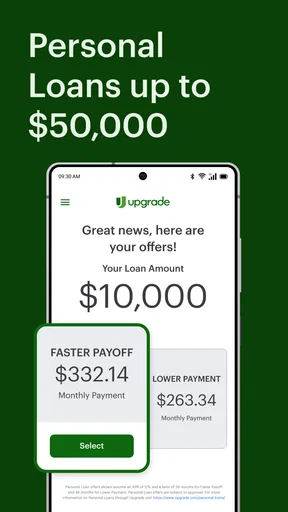
For a loan, I would begin with the repayment amount I can genuinely handle each month, not the largest amount the application presents. That mindset matters because a convenient application flow can make borrowing feel easier than the long-term commitment really is. I would use the app to explore the available loan path, then compare the full repayment obligation with a bank loan or another lender before accepting anything.
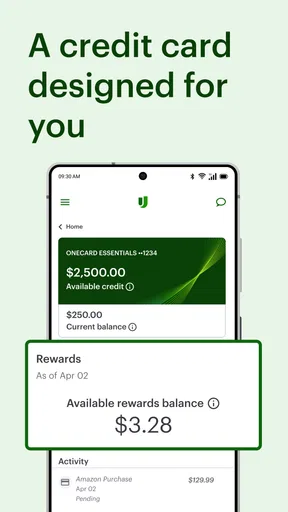
For the card, I would think of it as a spending tool that needs a clear role. It may be useful for someone who wants card activity and checking-style money management connected in one place, but I would not use it as permission to increase everyday spending. A repeatable habit works better: check the balance before a large purchase, review recent activity after recurring bills clear, and keep the card tied to expenses already present in the monthly plan.
Rewards checking deserves its own routine. I would use it for regular cash-flow tasks rather than moving every account immediately. A sensible test is to direct one predictable income stream or a small group of recurring expenses through it, observe how the account fits your schedule, and only then decide whether it should become your main checking option.
Worth Reading Before You Choose

Baby Panda World Brings Quick Play to Modern Phones, but Its Game Library Feels Busy

ESPN’s Live Game View Makes Following Close Games Easier

QuizzLand Review: A Good Fit for Short Trivia Breaks, Not Every Player

Basketball Stars: Multiplayer Is Fast, but Can It Recover When Matches Go Wrong?

WEBTOON Turns Phone Updates Into a Better Reading Routine

Link to Windows Runs on Shared Habits, Not Social Feeds
The most useful baseline is separation of purpose: loans are for planned borrowing, the card is for controlled spending, and checking is for daily cash movement. Keeping those roles distinct makes the app easier to understand and reduces the risk of treating available credit as available income.
One realistic monthly scenario
Imagine I have a fixed paycheck, a rent payment, several subscriptions, and an upcoming repair that I cannot cover comfortably from one pay period. I might use Upgrade to review a personal-loan option while comparing the total cost against delaying the repair or using savings. If I proceed, I would place the expected payment into my monthly budget before touching the card.
At the same time, I could use rewards checking for ordinary bills and keep the card limited to planned purchases. Near payday, I would review the checking balance, confirm that the loan payment is accounted for, and inspect card activity for anything unexpected. This workflow is not flashy, but it turns the app into a repeatable checkpoint instead of a source of impulsive decisions.
The important detail is that I would not mix the repair expense with routine card spending just because both appear in the same app. The unified interface is convenient, but the user still has to maintain the boundaries. Upgrade can organize these products; it cannot create a budget discipline on its own.
Settings and choices I would check first
The first settings worth checking are the ones that affect how often I look at money and how clearly I can recognize activity. I would review notification preferences so that useful account updates do not get buried under alerts I do not need. The goal is not maximum notifications; it is a small number of reminders that prompt a real action, such as reviewing a transaction or checking an upcoming obligation.
I would also examine how the app presents the different products. When an app combines lending, cards, and checking, it is worth slowing down at each application or offer screen. I would read the repayment details, account terms, and any conditions shown in the flow rather than relying on a headline figure. The practical question is always, “What will this require from my monthly cash flow?”
Security settings deserve attention before normal use. I would enable the strongest sign-in protection the app offers on my device and avoid leaving a financial session open when someone else can access the phone. I would also keep the operating system current enough to meet the app’s requirements. The current version is 1.33.0 and requires iOS or Android 12, so users with older phones should check compatibility before building a routine around it.
Another useful check is whether the account information is still current. Financial apps are especially sensitive to old contact details, outdated employment information, or an account that no longer reflects a person’s situation. I would review those details before applying for a product, not after an unexpected result. That small pause can prevent an avoidable interruption in the process.
Faster habits that make the app less demanding
Experienced users do not need to open a finance app repeatedly without a purpose. I prefer a short, repeatable sequence. On a normal day, I would check the checking balance before spending, review card activity after major purchases, and reserve loan-related review for a planned budgeting session. This is faster than browsing every screen and more useful than reacting only when a problem appears.
A second habit is to use consistent labels in my own budget, even if the app’s internal presentation is different. I would group spending mentally into fixed bills, flexible essentials, and optional purchases. Then, when I look at recent activity, I can immediately identify whether a balance change is expected. This is particularly helpful when card and checking activity are both visible in one financial environment.
I would also create a personal “before applying” checklist outside the app: desired amount, affordable monthly payment, reason for borrowing, alternative options, and a date to reassess the decision. This is not an extra feature claim about Upgrade; it is a workflow that keeps the app’s application process connected to a larger financial decision.
For checking, a useful shortcut is to review the account at the same two points each week, such as just after income arrives and before the largest bills leave. That rhythm catches cash-flow problems earlier than an occasional end-of-month review. For the card, I would inspect activity after travel, online shopping, or any period with several small purchases, because those are the moments when an unnoticed transaction is easiest to miss.
These habits also answer a common practical question: do I need to use every part of Upgrade to benefit from it? No. I can use one product and ignore the others until there is a reason to consider them. The app’s value comes from fitting its tools into a clear money routine, not from activating everything at once.
Where Upgrade is more convenient than separate alternatives
The strongest argument for Upgrade is consolidation. A person who currently checks one app for a loan, another for card spending, and a third for checking may appreciate having these categories associated with one developer and one general money experience. That can reduce the mental cost of switching between services, especially when planning how a new payment will affect ordinary spending.
Compared with a traditional bank app, Upgrade may feel more focused on the connection between borrowing, card use, and rewards checking. Compared with a standalone budgeting app, it is closer to the financial products themselves than to a neutral planning dashboard. That distinction matters: a budgeting app may be better for someone who wants broad visibility across many institutions, while Upgrade is more appealing to someone considering its own set of financial services.
I would not automatically move away from a full-service bank just for a more modern interface. A bank that already handles my direct deposit, savings, bill payments, and customer support may remain simpler overall. Likewise, someone who wants detailed category analysis across multiple accounts may prefer a dedicated budgeting tool. Upgrade’s advantage is not universal superiority; it is the convenience of bringing particular borrowing and spending options together.
Trade-offs that become clearer with regular use
The combined design can also create friction. When loans, cards, and checking appear within the same app, it is easy to read the experience as one continuous pool of money. I have to remind myself that a loan is a liability, a card is a payment method, and a checking balance is cash available for current obligations. The interface can connect them, but the financial consequences remain different.
Another trade-off is that convenience can shorten the pause before a borrowing decision. I would compare the complete cost and repayment schedule with alternatives before accepting an offer, even if the application feels straightforward. Someone who is trying to reduce debt may be better served by a plan that addresses existing balances directly rather than adding another product because it is readily available in the same app.
There is also a practical learning curve. A user who only wants a basic checking account may find the presence of loan and card options distracting. Conversely, someone interested only in a personal loan may not care about rewards checking at all. I would skip Upgrade if I wanted a purely neutral budgeting tool, a single-purpose savings app, or an established bank relationship that already meets my needs without another account to monitor.
Limits I would keep in mind before committing
I would avoid assuming that an in-app option is automatically the cheapest option. Loan suitability depends on the individual offer and the borrower’s circumstances, so comparison shopping remains essential. The same applies to card use: rewards are only worthwhile when they do not encourage purchases that were not already planned.
I would also be cautious about using the app as my only financial reference point. Keeping important records, checking statements carefully, and knowing where recurring payments are coming from are sensible habits with any financial service. If an account is used for rent, utilities, or income, I would give myself enough time to understand its normal activity before relying on it for every essential transaction.
The age and device requirements may affect some users as well. Upgrade is available for people using iOS or Android 12 and newer, while anyone on an older operating system may need to update or use another option. That is a small issue for many current phones, but it is worth checking before switching an important account.
The app is free to install, but that should not be confused with every financial product being cost-free. I would treat the download price and the cost of borrowing or using an account as separate questions. Before agreeing to anything, I would read the figures and terms shown for that specific product and consider how they fit my budget.
Who will get the most from it?
Upgrade makes the most sense for someone who wants a combined view of personal loans, card spending, and rewards checking, and who is willing to manage those tools deliberately. It can be especially practical for a person trying to simplify a scattered financial routine without expecting the app to make every decision automatically.
It is less suitable for someone who is actively trying to avoid new credit, wants a highly detailed multi-bank budgeting system, or prefers to keep lending completely separate from everyday banking. It may also be a poor match for a user who wants only a basic account and would find additional product options distracting.
My advice is to start with the one need that brought you to the app. If that need is checking, establish a normal bill-and-income routine before considering anything else. If it is a loan, compare the full obligation before applying. If it is card management, set a spending boundary first. This approach lets the app prove its usefulness without turning convenience into overcommitment.
My verdict after looking at the complete workflow
Upgrade is best when consolidation supports a plan, not when it replaces one. I like the idea of handling personal loans, card activity, and rewards checking in one finance app, and the free entry point makes it easy to explore. The broad adoption and solid average rating reinforce that it is a serious option rather than an obscure experiment.
Still, I would recommend it with a clear condition: use the app as an organized access point, then make the important decisions with your own budget and comparisons. The strongest users will check settings, create repeatable review times, separate cash from credit, and read each product’s terms before committing. Those habits reveal the app’s real strength, which is convenience with structure.
Upgrade, Inc. released the app on March 21, 2019, and its current version is 1.33.0. After considering its workflow, I see it as a good fit for people who want a connected approach to borrowing and spending, but not as a universal replacement for a bank, a savings strategy, or a dedicated budgeting system. I would recommend trying it carefully, starting with one defined use case and expanding only when the numbers make sense.
Pros
- Simple interface makes upgrading and managing your plan easy.
- Clear account details help users track available benefits and usage.
- Convenient access to upgrade options directly from a mobile device.
- Useful for comparing plans before choosing a higher subscription tier.
- Account changes can usually be completed without contacting support.
Cons
- Upgrade prices may vary by region
- platform
- or current subscription.
- Some features may require recurring payments rather than a one-time fee.
- Refund and cancellation rules can be difficult to understand.
- Higher plans may offer limited value for users with basic needs.
- An upgrade may not take effect immediately in every account or service.
FAQs for Upgrade
What is Upgrade, and what can I use it for?
Upgrade is a personal finance application designed to help users manage borrowing, spending, and everyday money needs in one place. Depending on your eligibility and location, it may provide access to personal loans, a checking account with a debit card, credit-building features, and tools for monitoring your finances. Available products can vary, so review the current terms before applying.
Is Upgrade available for both Android and iOS devices?
Upgrade can generally be accessed through mobile devices, including Android and iOS smartphones, as well as through its website. Before downloading, check that your phone meets the app’s operating-system requirements and that the service is available in your country. Some financial products and features may be limited by location, account type, or eligibility.
Does using Upgrade affect my credit score?
The effect on your credit score depends on the product and action involved. Applying for certain credit products may involve a credit check, while making payments on an approved loan or credit account may be reported to credit bureaus. Late or missed payments can negatively affect your credit. Always read the disclosure information to understand the specific credit inquiry and reporting policy.
Are there fees associated with Upgrade?
Upgrade may charge different fees depending on the product you use. Potential costs can include interest, origination fees on some loans, late-payment fees, or other account-related charges. The exact amount, annual percentage rate, and repayment terms are normally shown before you accept an offer. Do not rely only on promotional claims; compare the full cost with other options.
Is Upgrade safe to use, and what should I check before signing up?
Upgrade uses standard security measures intended to protect account information, but no financial service is completely free from online risks. Use the official app store, create a strong unique password, enable available security features, and avoid sharing verification codes. Before registering, confirm the company’s current privacy policy, eligibility rules, fees, repayment obligations, and whether the offered service suits your financial situation.


